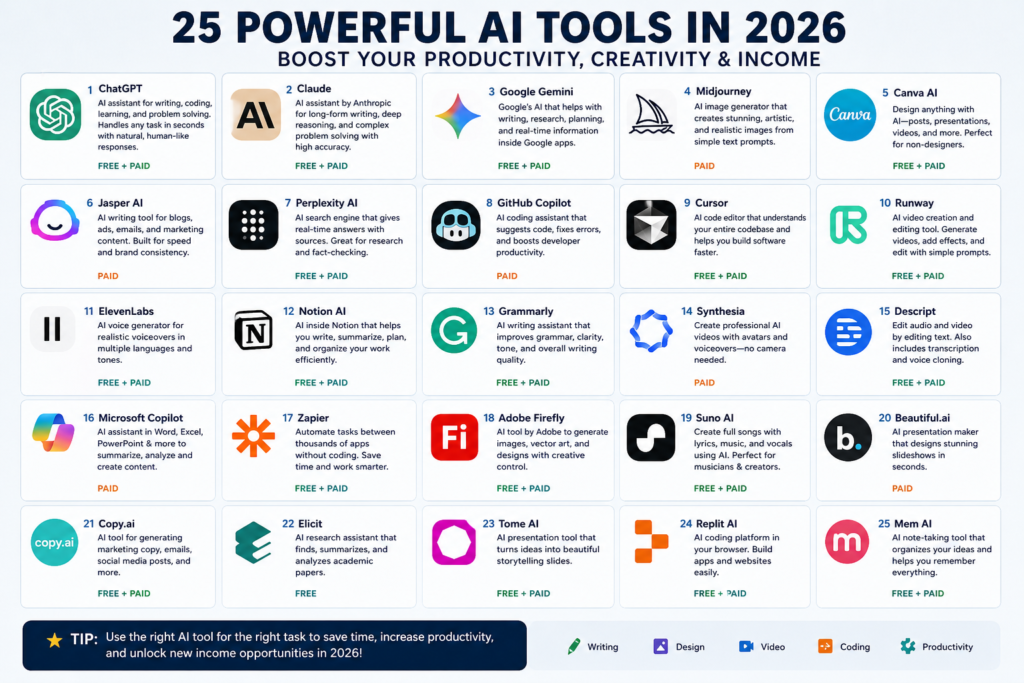
Here are 25 powerful AI tools (2026) with clear 4-line descriptions and whether they are Free / Paid. I’ve selected tools across writing, design, video, coding, and business so you get a complete ecosystem.
1. ChatGPT
A powerful all-in-one AI assistant for writing, coding, research, and automation.
Supports text, images, voice, and advanced workflows in one platform.
Used by students, freelancers, and businesses worldwide. Free + Paid (Plus/Pro plans) (www.cognitivekraft.com)
2. Claude
Best known for long-form writing and deep reasoning tasks.
Handles large documents and complex instructions very smoothly.
Produces clean, human-like content with fewer errors.
Free + Paid (www.cognitivekraft.com)
3. Google Gemini
Integrated with Google Docs, Gmail, and Sheets.
Great for research, summaries, and real-time information.
Strong alternative to ChatGPT in Google ecosystem.
Free + Paid (Gpt-Chat)
4. Midjourney
Creates high-quality artistic and realistic images from text prompts.
Popular among designers and content creators.
Offers cinematic and creative control over visuals.
Paid only (ToolWise)
5. Canva AI
Beginner-friendly tool for graphics, social media, and presentations.
AI helps generate designs, posts, and marketing content instantly.
No design skills required to create professional visuals.
Free + Paid (ToolHorizon –)
6. Jasper AI
Designed for marketing content like ads, blogs, and SEO articles.
Used by agencies and businesses for brand voice consistency.
Fast content generation with templates and workflows.
Paid (limited trial) (AI Tools Breakdown)
7. Perplexity AI
AI-powered search engine with real-time answers and sources.
Great for research, fact-checking, and learning.
Provides citations for accurate information.
Free + Paid (AI Tools Breakdown)
8. GitHub Copilot
Helps developers write code faster inside IDEs.
Suggests entire functions and fixes errors automatically.
Widely used by programmers and software engineers.
Paid (limited free for students) (AI Tools Breakdown)
9. Cursor
An advanced AI coding tool that understands entire codebases.
Allows natural language coding and debugging.
Ideal for developers building large applications.
Free + Paid (AI Tools Breakdown)
10. Runway
Creates and edits videos using AI tools and effects.
Supports text-to-video and visual editing workflows.
Used by YouTubers and filmmakers.
Free + Paid (AI Tools Breakdown)
11. ElevenLabs
Generates realistic human-like voiceovers.
Supports voice cloning and multiple languages.
Perfect for YouTube, audiobooks, and ads.
Free + Paid (ToolHorizon –)
12. Notion AI
Helps with notes, tasks, and document writing.
Organizes workflows and team collaboration.
Combines workspace + AI assistant in one app.
Free + Paid (AI Tools Breakdown)
13. Grammarly
Improves grammar, clarity, and tone in writing.
Useful for emails, essays, and professional content.
Provides real-time corrections and suggestions.
Free + Paid (AI Tools Breakdown)
14. Synthesia
Creates videos with AI avatars and voiceovers.
No camera or actors needed for video production.
Used for training, marketing, and tutorials.
Paid
15. Descript
Edits audio and video like a text document.
Includes transcription and voice cloning tools.
Great for podcasts and content creators.
Free + Paid
16. Microsoft Copilot
Works inside Word, Excel, and PowerPoint.
Automates reports, analysis, and presentations.
Boosts productivity for office work.
Paid (Gpt-Chat)
17. Zapier
Automates tasks between apps without coding.
Connects thousands of tools and workflows.
Saves time on repetitive tasks.
Free + Paid (TechRadar)
18. Adobe Firefly
Generates images and designs using AI.
Integrated with Adobe creative tools.
Great for professionals and designers.
Free + Paid (Tom’s Guide)
19. Suno AI
Creates full songs with lyrics and music.
Perfect for creators and musicians.
Produces high-quality tracks instantly.
Free + Paid (TechRadar)
20. Beautiful.ai
Automatically designs professional presentations.
AI adjusts layout and design instantly.
Great for business and students.
Paid (ToolWise)
21. Copy.ai
Generates marketing content and ad copy.
Useful for startups and businesses.
Supports multiple content formats.
Free + Paid
22. Elicit
Helps analyze academic papers and research.
Summarizes findings and extracts insights.
Great for students and researchers.
Free
23. Tome AI
Creates storytelling presentations with AI.
Combines visuals, text, and structure automatically.
Ideal for pitching ideas.
💰 Free + Paid
24. Replit AI
Browser-based coding with AI assistance.
Helps build apps without complex setup.
Beginner-friendly for developers.
Free + Paid
25. Mem AI
Automatically organizes notes and ideas.
Learns from your workflow and suggests content.
Useful for productivity and knowledge management.
Free + Paid
✅ Advantages of AI Tools
1. Increase Productivity
AI tools can complete tasks in seconds that normally take hours.
Writing, designing, coding, and editing become much faster.
This helps freelancers and businesses scale quickly.
You can do more work with less effort.
2. Help in Earning Money
AI tools open multiple income streams like freelancing and content creation.
You can create blogs, videos, and designs without expert skills.
Many people earn online using AI-generated content.
Great for beginners with zero experience.
3. Easy to Use
Most AI tools are beginner-friendly with simple interfaces.
No technical knowledge is required to start.
Just give instructions (prompts), and AI does the work.
Perfect for students and new users.
4. Automation of Tasks
AI can automate repetitive work like emails, data entry, and posting.
Saves time and reduces manual errors.
Businesses can run more efficiently.
Improves workflow management.
5. Creativity Boost
AI generates new ideas, designs, and content instantly.
Helpful for content creators and marketers.
You can experiment with unlimited variations.
Removes creative blocks.
6. 24/7 Availability
AI tools work anytime without breaks.
No need for human availability.
Useful for global businesses.
Increases efficiency and speed.
❌ Disadvantages of AI Tools
1. Lack of Accuracy
AI sometimes gives wrong or outdated information.
Needs human verification before use.
Not 100% reliable for critical decisions.
Mistakes can cause problems.
2. Paid Features
Most powerful features require paid plans.
Free versions have limitations.
Costs can increase over time.
Not always affordable for beginners.
3. Dependency on AI
Overuse can reduce your own skills and creativity.
People may rely too much on AI.
Learning ability may decrease.
Balance is important.
4.Privacy Concerns
Some tools collect user data and inputs.
Sensitive information can be at risk.
Not all platforms are fully secure.
Always be careful with personal data.
5. Lack of Human Touch
AI content may feel robotic or less emotional.
Not always suitable for deep personal communication.
Requires editing to sound natural.
Human creativity is still important.
6. Ethical Issues
AI can be misused for fake content or misinformation.
Raises concerns about originality and plagiarism.
Can impact jobs in some industries.
Needs responsible usage.